Rose Flowers SVG Bundle: A Designer's Field Test
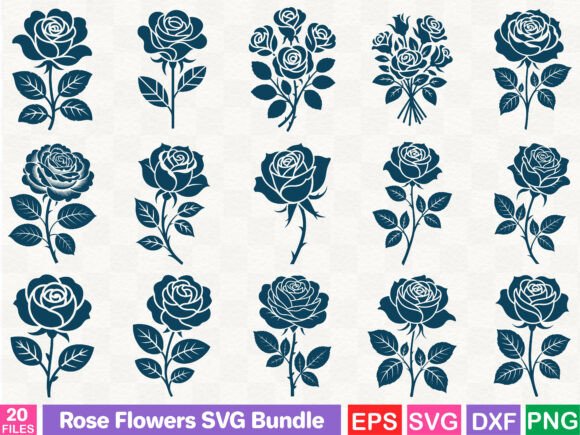
When I first opened the Rose Flowers SVG Bundle, my immediate reaction wasn't just about the aesthetic appeal, but about its potential translation from a flat digital graphic into a tactile, stitched reality. As someone who spends hours hooped up at the machine, I look at Illustrations and Graphics differently than a graphic designer might. I am looking for stitch paths, density balance, and how the design will behave on textured fabric. This bundle presents itself as a versatile asset, marketed for prints, mugs, and posters, but my job is to determine if it holds up under the needle for serious embroidery projects.
First Impressions: Mood and Visual Personality
The visual personality of this bundle leans heavily into romantic and classic territories. The rose motifs are rendered with a clean, vector-based precision that suggests they were originally intended for high-resolution printing. For an embroiderer, this is a double-edged sword. On one hand, the lines are crisp, making digitization or auto-digitizing much cleaner than working with pixelated images. On the other hand, the level of detail in some of the petal layers might be too fine for standard home embroidery machines without significant adjustment.
The mood created is soft and inviting, perfect for boutique branding or personalized gifts. However, before committing to a client project, one must assess the "stitchability." Does the design rely on gradients that cannot be replicated with thread? In this case, the shapes are solid enough to suggest they could work well as fill stitch areas or even as templates for applique design work, where you stitch down a piece of fabric rather than filling the entire area with thread. This approach often yields a more professional finish on garments like sweatshirts or tote bags.
Real-World Application: The Custom Tote Bag Scenario
To truly test the Rose Flowers SVG Bundle, I envisioned a specific real-life scenario: a custom order for a local florist needing branded tote bags for their weekend market stall. The goal was to create a handmade product that felt elevated but durable enough for weekly use.
I selected a natural canvas tote, a fabric with a distinct weave that can sometimes swallow up fine details. Using a medium-weight cutaway stabilizer to prevent distortion, I prepared the file. Since the bundle is provided as an SVG, it required conversion into a proper machine embroidery design format compatible with my specific hoop. This is a crucial step often overlooked by hobbyists; an SVG is a cut file or print vector, not inherently an embroidery file with stitch data unless specified otherwise by the seller.
Once digitized with appropriate satin stitch borders and lighter density fills, the result was striking. The roses popped against the neutral canvas. The customer reaction to such a finished product would likely be very positive, as the floral theme aligns perfectly with the florist's brand. However, had I attempted to stitch this directly onto a thin, stretchy t-shirt without proper stabilization, the result would have been puckered and unprofessional. This highlights the importance of matching the design complexity to the fabric texture.
Navigating Technical Challenges and Fabric Choices
While the Rose Flowers SVG Bundle offers great versatility, there are specific scenarios where caution is required. If you are planning to use these graphics for baby embroidery on onesies, you must be wary of stitch density. Babies have sensitive skin, and a dense block of satin stitching can feel scratchy and uncomfortable. In such cases, I recommend reducing the fill density or converting the design into a outline-only style using running stitch techniques.
Similarly, curved surfaces like caps present a unique challenge. The structural seams of a cap can distort circular or wide floral arrangements. If you are an Etsy seller offering customized hats, you might need to isolate a single rose from the bundle rather than using a full bouquet layout to ensure it fits within the limited hoop size available on cap frames. Dark fabrics also require strategic thinking. If the original graphic relies on light colors, you may need to manually adjust the thread colors in your software to ensure sufficient contrast, or add a white underlay to prevent the dark fabric from showing through the stitches.
Considerations for Commercial Use and Small Shops
For craft business owners and creative entrepreneurs, the value of a design lies not just in its beauty, but in its reliability. A design that breaks frequently or requires constant trimming increases production time and eats into profit margins. The clean lines of this bundle suggest it could be efficient for batch production, such as creating a series of embroidered patches or kitchen towels for holiday gifts.
However, before listing these as design assets or selling finished items, you must verify the licensing terms. The product description mentions suitability for "prints, t-shirt designs, mug making," which implies commercial intent, but it does not explicitly state the rules for reselling the digital file itself versus the physical custom apparel. Always confirm whether the license allows for unlimited physical sales or if there is a cap on the number of units you can produce.
Practical Designer Notes for Success
To get the most out of the Rose Flowers SVG Bundle, I recommend following a strict testing protocol before touching customer fabric:
- Test on Scrap First: Always stitch a sample on the exact same fabric weight and type you intend to use for the final product.
- Check Contrast: View your digitized version in black and white to ensure the different elements of the rose separate clearly without blending into a muddy mess.
- Review Density: If the design feels stiff after stitching, reduce the fill density in your embroidery software.
- Stabilizer Selection: Match your stabilizer to the fabric; use tear-away for stable wovens like towels and cut-away for stretchy knits like sweatshirts.
- Inspect Small Details: Look closely at the petal tips. If they are too sharp, they may cause thread breaks. Rounding these corners slightly in the software can improve stitch quality.
- Verify File Compatibility: Ensure you have the software to convert the SVG into the specific digital embroidery file format your machine reads (e.g., PES, DST, EXP).
In conclusion, the Rose Flowers SVG Bundle is a promising resource for those willing to put in the preparatory work. It bridges the gap between modern graphic trends and traditional needlework. Whether you are creating holiday embroidery for family, wedding gifts for clients, or stock for your small shop product line, this design has the potential to elevate your offerings. Just remember that a great graphic becomes a great embroidery project only through careful planning, proper digitization, and respect for the limitations of the machine and fabric. By treating these Graphics as a starting point rather than a finished solution, you can create stunning, durable, and highly sellable items that customers will cherish.